
A safe server relocation comes down to five non-negotiables: verified backups with a tested restore, a complete labeled inventory backed by photos, a new site with power and network ready before the trucks arrive, climate-controlled transport with a documented chain of custody, and one coordinator who owns the entire cutover from shutdown to first ping. Skip any one of these and you're not moving a server room, you're gambling with it.
TL;DR:
- Verified backups must be tested and stored off-site or in the cloud to ensure data recovery if hardware is damaged during transport.
- Complex server environments require at least 8 to 12 weeks of planning, while smaller setups can move with 4 to 6 weeks if preparation is on schedule.
- Clear role assignments and written responsibility matrices prevent miscommunication, especially for backup verification, labeling, and logistics.
- Accurate inventory documentation includes asset IDs, serial numbers, hostname, IP addresses, cable maps, and photos to streamline reassembly and troubleshooting.
- Use climate-controlled, vibration-dampening transport with tamper-evident seals, GPS tracking, and proper packing to protect equipment against environmental and handling risks.
Table of Contents
- Building a Server Relocation Checklist That Actually Holds Up
- Preparing Equipment for Transport: Labeling, Packing, and Custody
- Move-Day Execution: Shutdown Order and On-Site Coordination
- Reassembly and Testing: The Checklist That Proves the Move Worked
- Insurance, Liability, and Your Contingency Plan
- Post-Move Performance Monitoring and Benchmarking
- Compliance and Regulatory Considerations During Relocation
- Security Measures for Transport and the New Site
- Communicating the Move to Stakeholders and End Users
- Atlantic Star's Perspective on Managed Server Relocations
- Get a Managed Server Relocation Plan From Atlantic Star Relocations
- Sources
- FAQ
Building a Server Relocation Checklist That Actually Holds Up
Most server relocation checklist templates read like generic office-move documents with "IT equipment" bolted on as an afterthought. That's a mistake. Servers don't tolerate the same handling as desks and filing cabinets, and a moving crew that treats a rack like a bookshelf will cost you a weekend of downtime, or worse, a failed restore.
The planning window matters more than most teams assume. Complex environments, meaning multiple racks, active directory dependencies, or a data center room with dedicated cooling, need 8 to 12 weeks of lead time to do this right. A small server closet with a handful of units can move in 4 to 6 weeks, provided the pre-move tasks below get done on schedule rather than crammed into the final week.
Who owns what before move day
Nobody should be guessing who signs off on the backup, who accepts the truck, or who makes the go/no-go call. Put it in writing:
- Project lead (usually facilities or operations) owns the master timeline and vendor communication.
- IT lead owns backup verification, shutdown sequencing, and post-move testing sign-off.
- Move coordinator (your mover's point of contact) owns transport logistics, crating, and delivery acceptance.
- Executive sponsor makes the final go/no-go call if something looks wrong 48 hours out.
A responsibility matrix like this prevents the classic failure mode: IT assumes the movers handled the backup, movers assume IT handled the labeling, and nobody actually did either.
The inventory that saves your sanity
Your inventory sheet needs more than a device count. For every unit, capture:
- Asset ID and serial number
- Hostname and IP address
- Rack U position and PDU port assignment
- Front and back photos
- A cable map noting both endpoints, port numbers, and cable type
This isn't paperwork for its own sake. Photographic cable documentation is what turns a four-hour reassembly nightmare into a 45-minute job, because nobody's standing at the new rack trying to remember which patch cable went where.
Backups, and then backups of the backup verification
Run a full backup, then actually test the restore before move day. A backup that's never been restored is a hypothesis, not a safety net. Store that verified backup off-site or in the cloud, physically separate from the hardware being transported. If the truck has a problem, your data shouldn't be riding in it.
New-site readiness
Before anything ships, confirm the destination can actually receive it: PDU and UPS capacity matched to your load, cooling with a real BTU margin (not just "enough for now"), fire suppression type, network drops terminated and tested, ISP circuit activation scheduled with lead time, and a clear loading path with elevator or dock access confirmed. ISP installs are notorious for slipping, so book that appointment the same week you lock your moving date.
Preparing Equipment for Transport: Labeling, Packing, and Custody
Labeling is where most server relocation plans quietly fall apart. It's not enough to tag the server. Label both ends of every cable, network and power alike, with the port number and destination rack U position written on the tag itself, not just a code you'll have to look up later.
Photograph every device and every cable connection before disconnecting anything. This single habit, confirmed across multiple relocation guides, routinely saves hours during reassembly because your team has a visual reference instead of a memory.
Packing materials matter as much as labeling:
- Anti-static bags for drives, memory modules, and any exposed components
- Rigid flight cases with cradle padding for individual servers and switches
- Rails secured or removed and bagged separately, drives locked down before movement
- Cables coiled, tagged, and sealed in labeled accessory bags per device
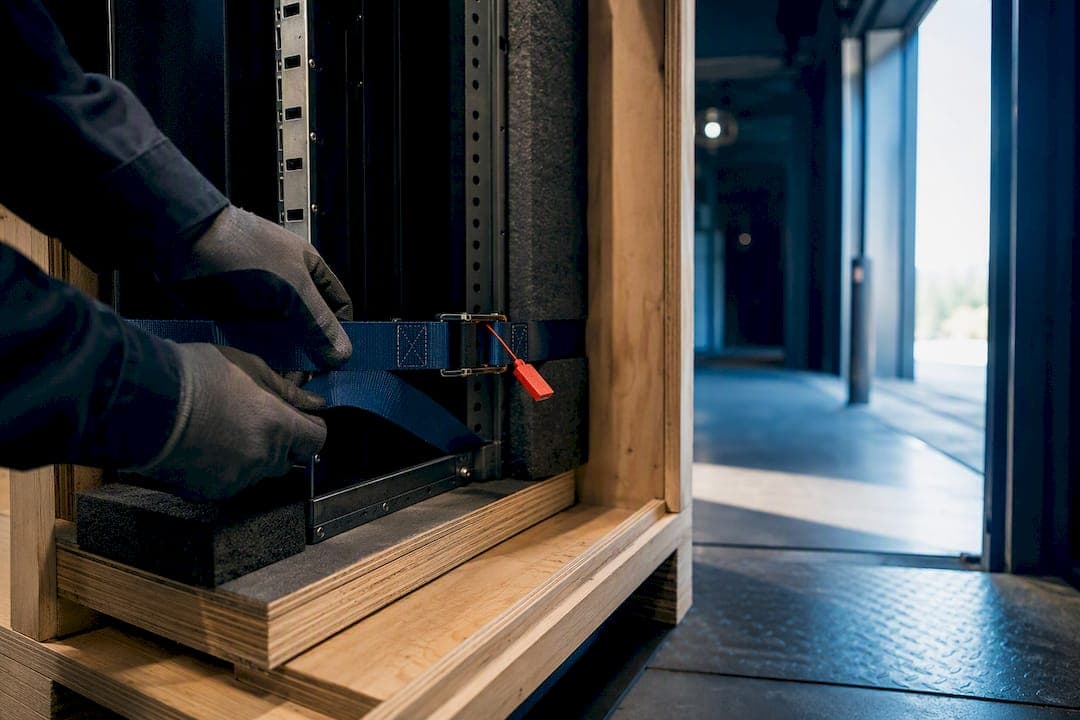
Transport specs aren't negotiable for anything running production workloads. Insist on climate-controlled vehicles with air-ride suspension, tail-lift loading to avoid tilting racks on stairs, secure locking compartments, and GPS tracking for high-value loads. Keep racks upright throughout, use vibration-dampening dollies rather than standard hand trucks, and strap everything down. Tamper-evident seals on crates give you an auditable chain of custody if a dispute ever comes up later.
Pro Tip: Let equipment sit at room temperature for at least an hour before powering it on after transport. Cold hardware pulled straight off a truck can develop internal condensation, and that's a hardware failure waiting to happen, not a software glitch.
Move-Day Execution: Shutdown Order and On-Site Coordination
Freeze all non-essential changes 72 to 24 hours before the move. No patches, no config changes, nothing that could complicate a rollback if something goes sideways.
- Stop application services first, giving each one time to close connections gracefully rather than force-killing processes.
- Shut down databases only after confirming no active transactions are mid-write.
- Power down storage arrays last among the software layer, once databases confirm a clean stop.
- Shut down physical servers, then network devices (switches, routers, firewalls) in that order.
Loading should follow reverse-reassembly logic: priority items go on last and come off first, so your most critical hardware is the first thing your team touches at the new site.
On-site coordination needs its own checklist: confirmed building access and loading dock windows, elevator reservations at both locations, security sign-in procedures, and signature-based handovers at every custody transfer point. Run a dedicated move communication channel, whether that's a group chat or a shared line, with named escalation contacts so a stalled truck or a locked freight elevator doesn't turn into a lost afternoon of phone tag.
Reassembly and Testing: The Checklist That Proves the Move Worked
Physical placement comes first: rack installation, leveling, grounding verification, and PDU connections confirmed against your original mapping sheet before a single cable goes back in.
Power-up sequence runs opposite to shutdown. Bring up network backbone equipment first, meaning switches, routers, and firewalls, then storage arrays, and only then servers and the applications riding on them.
Testing isn't optional and it isn't quick. Work through:
- Physical link verification on every port against your cable map
- Authentication and directory service checks
- Database connectivity from application servers
- Application-level smoke tests for core business functions
- Backup job verification, confirming the first post-move backup actually completes
- Monitoring and alerting confirmed active and reporting correctly
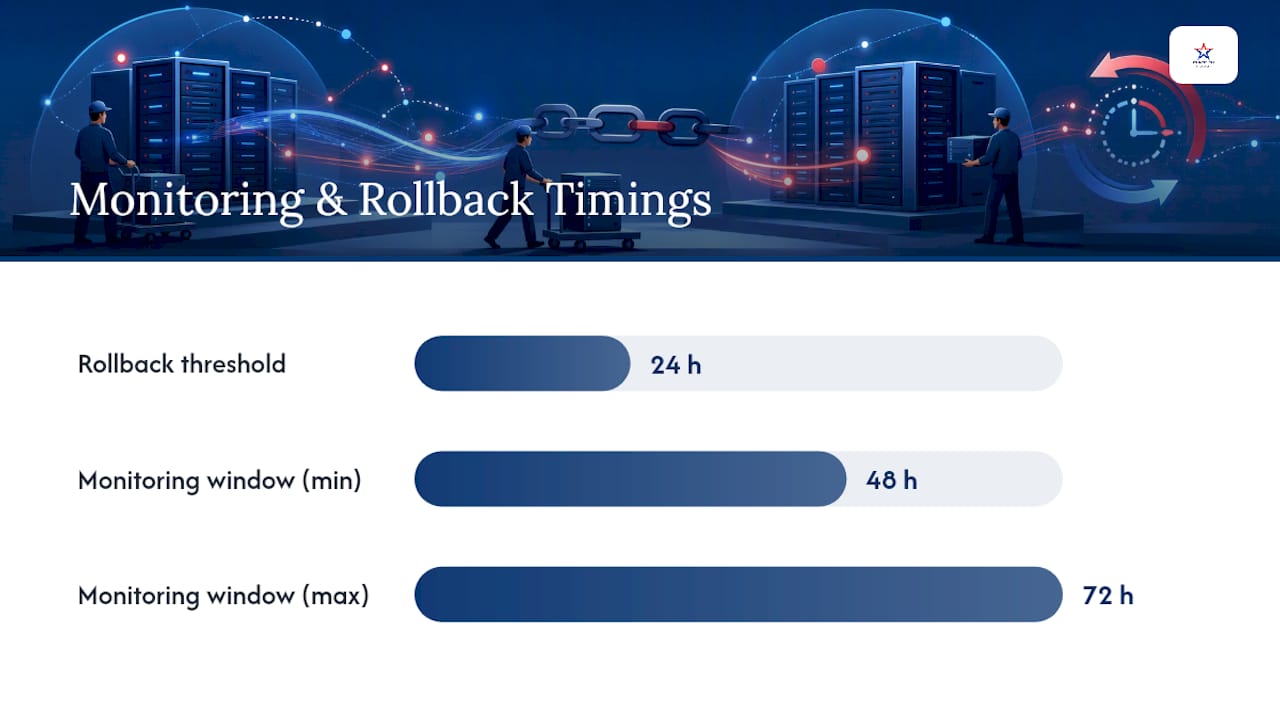
Recommended monitoring windows run 48 to 72 hours with documented checkpoints at set intervals, and a clear rollback trigger defined in advance: if a specific service isn't stable by hour 24, who decides to fail back, and to what?
Close the loop by reconciling your inventory against what actually arrived and updating documentation with the new site's rack positions, IP assignments if they changed, and any damage exceptions noted at delivery. A full IT relocation guide is worth keeping on hand for teams running this process for the first time, since the reassembly phase is where most timeline overruns actually happen.
Insurance, Liability, and Your Contingency Plan
Standard mover coverage usually calculates liability by weight, which is close to meaningless for a server worth more than the truck carrying it. Confirm a declared value and ask specifically about specialized equipment or transit insurance rather than assuming the general policy covers you.
- Photograph condition before pickup and after delivery to support any claim
- Maintain chain-of-custody records through every handoff
- Stage a contingency: temporary cloud failover, spare hardware ready to deploy, and a fallback timeline if the primary plan slips
- Get contract language in writing covering exactly what the mover is responsible for: packing, transport, delivery acceptance, and the dispute process if something arrives damaged
None of this is paperwork for paperwork's sake. It's the difference between a documented claim and an argument nobody wins.
Post-Move Performance Monitoring and Benchmarking
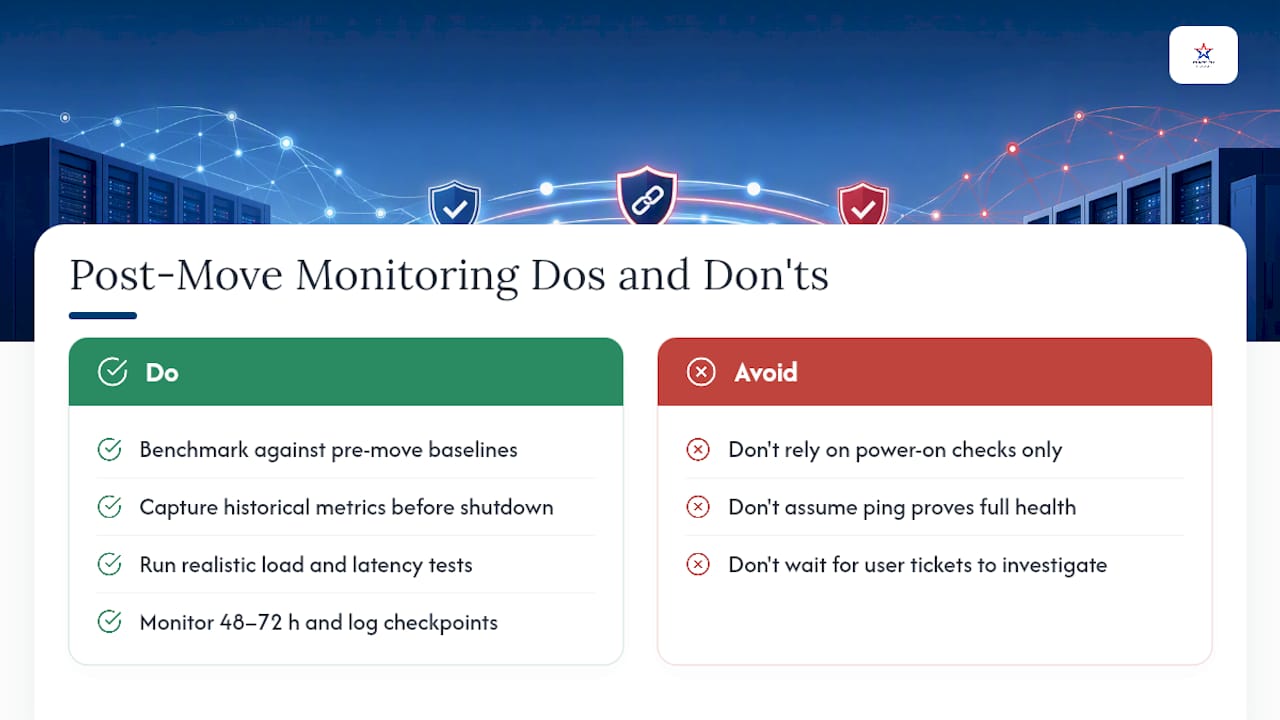
The move isn't finished when the last cable gets plugged in. Benchmark performance against pre-move baselines, not just "does it turn on." Pull historical metrics before you shut anything down, meaning disk I/O, memory utilization, network throughput, and application response times, so you have something real to compare against once everything is back online.
Watch for the quiet failure modes: a drive that survived transport but is throwing early SMART errors, a network card running at a fallback speed because a connection isn't fully seated, or a database that's technically up but running slower because an index needs rebuilding after an unclean shutdown. These don't always show up in a basic ping test.
Run load tests that approximate real usage rather than idle checks, particularly if the new site has different network topology or a different ISP circuit than the old one. Latency to cloud services, VPN throughput, and failover behavior all deserve a specific look, not an assumption that "it worked before, it'll work now."
Give yourself a defined comparison window, ideally the same 48 to 72 hour monitoring period used for basic validation, and log results at set checkpoints rather than checking once and calling it done. If numbers are off from baseline by more than a small margin, that's your signal to investigate before declaring the relocation complete, not after end users start filing tickets.
Compliance and Regulatory Considerations During Relocation
Data doesn't lose its regulatory status just because it's in transit. If your servers hold protected health information, payment card data, or personal information covered under state privacy law, that data carries the same handling obligations on a moving truck that it does sitting in a locked server room.
Chain-of-custody documentation isn't just useful for insurance claims, it's often the exact evidence an auditor or regulator wants to see if a compliance question comes up later: who had physical access to the hardware, when, and under what controls. Encrypted drives should stay encrypted throughout the move, and any decommissioned hardware identified during a pre-move declutter needs certified destruction or wiping, not a spot in a dumpster.
Industry-specific rules add another layer. Healthcare organizations need business associate agreements covering any third party that touches equipment holding patient data. Financial services firms often have data residency and audit-trail requirements that dictate exactly how a server can travel and who can be in the room during transport and reinstallation.
None of this should be handled by guesswork. Loop in your compliance officer or legal counsel early enough that requirements shape the moving plan, rather than getting discovered the week before the move when it's too late to build in the right controls.
Security Measures for Transport and the New Site
Physical security during transport deserves the same seriousness as your firewall rules. Tamper-evident seals on every crate mean anyone who opens a case in transit leaves evidence. GPS tracking on the transport vehicle gives you a real-time location record, not just a promised delivery window.
Limit who has access to the truck and the loading process to a named, vetted list. A move with a dozen people touching hardware has a dozen more opportunities for something to go missing or get mishandled than a move run by a small, accountable crew.
At the new site, don't power anything up in an unsecured room. Confirm door access controls, camera coverage, and visitor logging are active before the first rack goes in, not after. If drives contain unencrypted sensitive data, encrypt them before the move rather than treating the move itself as a secure enough window.
Signature-based handovers at every custody transfer point create an audit trail that matters if a device ever turns up missing or damaged. That's not bureaucracy, it's the paper trail that protects both your company and your mover if a dispute ever surfaces.
Communicating the Move to Stakeholders and End Users
A server relocation nobody warned end users about turns a planned maintenance window into a flood of help desk tickets. Send a notice at least two weeks out with expected downtime windows, and follow up 48 hours before with specifics.
Keep the message simple for non-technical stakeholders: what's affected, when, and who to contact if something isn't working after the cutover. Save the shutdown sequencing and rack diagrams for the internal IT and facilities team running the move.
During the move itself, a dedicated status channel, whether it's a shared chat thread or a simple status page, keeps leadership and department heads from pinging IT individually for updates. Post checkpoints as they happen: trucks loaded, trucks arrived, network backbone up, applications verified. Silence during a move window breeds more anxious emails than an honest "still in progress" update ever will.
Once the monitoring window closes and everything's confirmed stable, send a clear all-clear message. That final communication matters as much as the warning did. It's what tells the business the disruption is officially over.
Atlantic Star's Perspective on Managed Server Relocations
Most of what goes wrong in a server move isn't the transport, it's the handoffs. IT hands off to the movers, the movers hand off to facilities, and nobody's actually accountable for the whole sequence. Atlantic Star Relocations serves to close that gap: one coordinator, one point of accountability, from the first inventory walkthrough to the final signature at delivery. That's how downtime gets minimized, not through luck, but through planning that treats a server room like the asset it actually is.
— Admin
Get a Managed Server Relocation Plan From Atlantic Star Relocations
A professional moving company handles the parts of a server relocation that generic movers skip: detailed inventory planning, anti-static and climate-controlled packing, secure transport coordination, and a direct line to your IT team for shutdown and reconnect timing. Instead of juggling separate vendors for movers, packers, and storage, you get one accountable coordinator running the whole cutover.

Services relevant to a server move include full planning and site-readiness review, professional packing services, secure transportation with chain-of-custody documentation, and short-term storage if your new site isn't quite ready when the old lease ends. Atlanticstargroup coordinates commercial relocations across Westchester County, New York City, Connecticut, New Jersey, and long-distance moves reaching Florida and beyond.
If you're planning an office move that includes on-premises servers, request a logistics coordination consultation or get a quote to schedule a site survey before you lock in a move date.
Sources
FAQ
How far in advance should we start planning a server relocation?
Complex environments need 8 to 12 weeks, while smaller server closets can work with 4 to 6 weeks if backups, labeling, and site checks stay on schedule.
What's the single most important item on a server relocation checklist?
A verified, tested backup restore matters more than any other step, since it's the only thing that guarantees recovery if hardware is damaged or delayed in transit.
How long should we monitor systems after reassembly?
Plan for a 48 to 72 hour monitoring window with documented checkpoints and a defined rollback trigger if a service isn't stable within that time.
Do we need special insurance for moving servers?
Standard mover coverage is usually weight-based and inadequate for server hardware, so confirm a declared value and ask about specialized equipment or transit insurance before move day.
Can a moving company coordinate directly with our IT team?
Yes. Atlanticstargroup assigns a single move coordinator who works directly with your IT lead on shutdown timing, transport, and reconnection so nothing falls into the gap between teams.