

IT relocation planning is defined as the structured process of preparing, coordinating, and executing the move of an organization's technology infrastructure, including servers, networks, workstations, and data systems, to a new location with minimal downtime. This process sits within the broader discipline of office relocation planning, but carries its own distinct risks and requirements. Organizations that skip or rush this phase routinely face data loss, extended outages, and hardware damage that cost far more than the move itself. Atlanticstargroup works with corporate clients across Westchester County, New York City, and the tri-state area to manage exactly this kind of complexity from day one.
What are the core components of IT relocation planning?
IT relocation planning covers six distinct areas that must be addressed before a single cable is unplugged. Missing any one of them creates gaps that show up as downtime on moving day.
- IT asset inventory. Document every piece of hardware, software license, and peripheral in your current environment. This list becomes the master checklist for packing, transport, and reinstallation.
- Network diagrams. Map your current network topology and design the target-state layout for the new space. This step reveals cabling requirements, switch placements, and firewall configurations before the move begins.
- Server and critical system migration plan. Identify which systems must come back online first. Prioritize customer-facing applications, communication platforms, and financial systems above all else.
- Backup and data protection. Run full verified backups of all systems before the move. IT relocation risks include data loss, hardware damage, and connectivity failures, and backups are the primary defense against all three.
- Contingency plans. Define what happens if a server fails to boot, a network switch arrives damaged, or internet service is delayed at the new location. Written contingency steps prevent panic decisions under pressure.
- Timeline. Starting 8 weeks ahead gives your team enough time to obtain competitive vendor quotes, schedule utility and internet transfers, and test systems before the final move date. That lead time is the single most effective cost-control measure available.
Pro Tip: Build a "day one critical systems" list separate from your full IT inventory. On moving day, that short list drives the reinstallation sequence and keeps the team focused on what matters most.
How does IT relocation planning integrate with broader office relocation?

IT planning does not happen in isolation. Every decision your IT team makes affects the physical move schedule, and every vendor your operations team books affects IT sequencing.
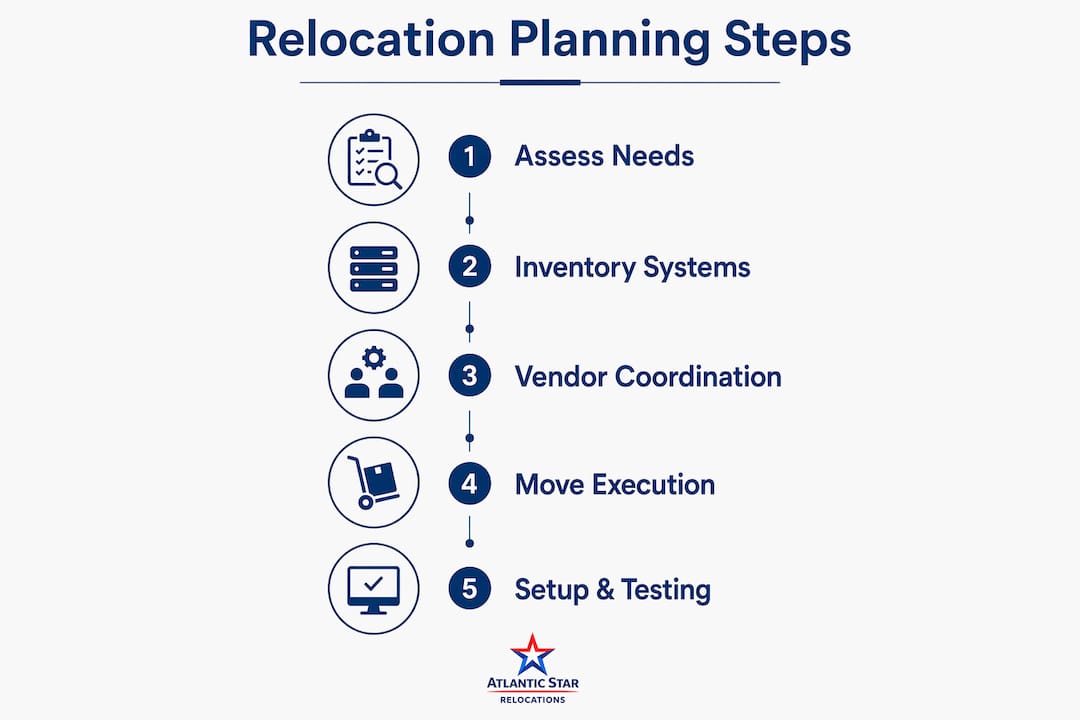
The most common coordination failure is misaligned downtime windows. Your IT team may need 48 hours to decommission servers and bring them back online, but the moving crew may be scheduled for a single weekend. Vendor consolidation simplifies scheduling and reduces this kind of conflict by keeping all parties on one coordinated timeline.
Key integration points to address early:
- Employee communication. Staff need to know which systems will be unavailable and for how long. Silence creates rumors and productivity loss before the move even starts.
- Utility and internet transfers. Coordinate with your internet service provider at least four to six weeks out. Transferring utilities smoothly requires lead time that most organizations underestimate.
- Vendor alignment. Your moving company, IT contractor, and facilities team must share a single master schedule. Gaps between their timelines become your downtime.
- Phased move options. For large organizations, moving departments in phases keeps some operations running while others relocate. IT infrastructure must be planned to support partial occupancy at both locations simultaneously.
Proper IT setup sequencing reduces system downtime and user disruption on moving day. That sequencing only works when IT and logistics teams have agreed on it weeks in advance.
What are the common risks in IT relocation, and how can they be mitigated?
Three risks cause the majority of IT relocation failures: data corruption, physical hardware damage, and connectivity delays at the new site. Each is preventable with the right preparation.
- Data corruption. Run full backups at least 48 hours before the move and verify them. Do not assume your backup ran successfully. Open files and confirm the data is intact.
- Hardware damage. Servers, switches, and workstations require anti-static packaging, climate-controlled transport, and careful handling. Experienced local movers familiar with IT logistics minimize damage risk and provide faster response when problems arise.
- Connectivity delays. Internet and phone service at the new location frequently runs behind schedule. Build a minimum two-day buffer between your scheduled service activation and your first day of full operations.
- Vendor insurance gaps. Confirm that your moving company carries cargo insurance that covers electronics. Standard liability coverage often excludes servers and networking equipment.
- Undocumented configurations. Systems that were configured years ago and never documented are the hardest to rebuild after a move. Photograph and document every rack, cable run, and configuration before disassembly.
Pro Tip: Assign one person as the IT relocation owner. That person attends every vendor call, signs off on every packing decision, and is the first one on site at the new location. Shared responsibility in IT moves almost always means no one is actually responsible.
What budgeting and timeline considerations should organizations expect?
Budgeting for an IT relocation depends on organizational size, infrastructure complexity, and how much lead time the team has. Organizations that start planning late consistently pay more, because last-minute vendor bookings, expedited shipping, and emergency IT support all carry premium rates.
| Planning Phase | Recommended Timing | Key Actions |
|---|---|---|
| Initial assessment | 8–12 weeks before move | IT asset inventory, network diagrams, vendor RFPs |
| Vendor selection | 6–8 weeks before move | Book movers, IT contractors, and internet provider |
| Equipment audit | 4–6 weeks before move | Identify upgrades, replacements, and disposal needs |
| Backup and testing | 1–2 weeks before move | Full system backups, connectivity tests at new site |
| Move execution | Move week | Phased reinstallation, critical systems first |
Starting 8 weeks before the move gives organizations access to better pricing and scheduling options across all vendor categories. Waiting until four weeks out narrows your choices and raises your costs. For corporate moves in the New York City and Westchester market, seasonal demand peaks in late spring and early fall, so booking early is especially important during those windows.
Employee relocation packages for international moves can reach $50,000 to $100,000 or more per person. That figure underscores why IT and operational planning must be treated as a budget line, not an afterthought.
What role does space planning play in relocation decisions?
Space planning is defined as the structured analysis of how an organization uses its physical environment, followed by the design of layouts that better support workflows, team structures, and technology needs. It belongs in every relocation conversation because it sometimes eliminates the need to move at all.
Space planning can identify layout reconfiguration options that increase capacity and efficiency without relocating. A company that believes it has outgrown its current office may discover, after a proper space analysis, that reallocating underused conference rooms or reconfiguring workstation clusters solves the capacity problem at a fraction of the cost of a full move.
Space planning involves structured analysis of office operations and produces tailored floor plans, including 3D visualizations of layout, flow, meeting rooms, and workstations, before any physical changes occur. That visualization step is particularly valuable for IT infrastructure planning, because it shows exactly where server rooms, cabling runs, and network closets will land in the new or reconfigured layout.
Modern office space planning focuses on aligning the physical environment with business goals, employee satisfaction, and operational efficiency. For organizations with hybrid work models, this means zoning for collaboration, focus work, and flexible meeting spaces, all of which carry different IT infrastructure requirements.
Pro Tip: Consult a space planner before signing a new lease or committing to a move date. The analysis typically takes two to four weeks and can save months of disruption if it reveals that your current space can be reconfigured to meet your needs.
Key Takeaways
Effective IT relocation planning requires early action, documented systems, and coordinated vendor management to protect operations and control costs.
| Point | Details |
|---|---|
| Start 8 weeks early | Early planning secures better vendor pricing and reduces last-minute risk. |
| Document everything first | A complete IT asset inventory and network diagrams are the foundation of every successful move. |
| Align IT and logistics timelines | Misaligned downtime windows are the leading cause of extended outages during office moves. |
| Consider space planning first | Reconfiguring your current space may solve capacity problems without the cost of a full relocation. |
| Use experienced local movers | Movers familiar with IT logistics reduce hardware damage risk and respond faster when issues arise. |
Why I think most organizations underestimate this process
After working with corporate clients across Westchester, Manhattan, and the broader New York metro area, the pattern I see most often is this: organizations treat IT relocation as a logistics task rather than a project with its own risk profile. They book the moving truck, they tell IT to "handle the computers," and then they are surprised when the office is dark for three days instead of one.
The details that cause the most delays are almost never the obvious ones. It is the undocumented server configuration from 2019. It is the internet provider that needs six weeks of lead time but was called at week two. It is the network switch that was packed without anti-static protection because no one told the crew it was sensitive equipment.
Atlanticstargroup's approach to corporate moves in the NYC and Westchester region is built around exactly this kind of oversight. The team coordinates vendors, tracks timelines, and resolves issues in real time so that the IT team can focus on systems rather than logistics. That single-point accountability model is what separates a smooth move from a costly one. I have seen organizations save days of downtime simply by having one person responsible for the full picture.
Atlanticstargroup: office and IT moving services for professionals
Atlanticstargroup provides corporate relocation services for organizations across New York City, Westchester County, Connecticut, and New Jersey, with a focus on managed execution and real-time accountability.

The team handles vendor coordination, move sequencing, and issue resolution from the first planning call through final delivery. For organizations moving offices, data rooms, or multi-location operations, Atlanticstargroup acts as the single point of contact across every moving part. Whether you need office moving support in Manhattan or a full logistics program across the tri-state area, the team brings local knowledge and structured oversight to every project. Contact Atlanticstargroup for a customized quote and a clear plan before your next move.
FAQ
What is IT relocation planning?
IT relocation planning is the process of organizing and executing the move of an organization's technology infrastructure, including servers, networks, and workstations, to a new location with minimal downtime and data risk.
How far in advance should IT relocation planning start?
Organizations should begin the IT relocation planning process at least 8 weeks before the move date to allow time for vendor selection, system backups, network design, and connectivity setup at the new location.
What are the biggest risks in an IT relocation?
The three primary risks are data loss, hardware damage during transport, and connectivity delays at the new site. Verified backups, proper packing, and early coordination with internet service providers address all three.
What does space planning have to do with relocation?
Space planning analyzes how an organization uses its current environment and can reveal reconfiguration options that eliminate the need to relocate entirely, saving significant cost and operational disruption.
Does Atlanticstargroup handle IT and office moves in Westchester and NYC?
Yes. Atlanticstargroup provides managed office and corporate relocation services across Westchester County, New York City, and the tri-state area, coordinating vendors, timelines, and logistics under a single point of accountability.